Starting the Simulation
Starting Simulation instructions
Quick Start Sequence
Starting the simulation with no arguments or via the MSI installation will present the StartUp Chooser offering a number of options.
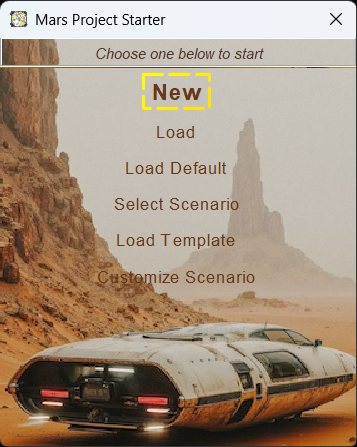
Main Starter
The New option start a new Simulation using the Default Scenario. Whilst the Select Scenario allows the selecting of a different pre-defined Scenario in a new Simulation.
Command Line Starting Sequence
The ZIP distribution supports both Windows and Linux and uses a command line starting sequence.
It also provides 2 variants of the mars-sim application.
- Swing based UI
- Console based engine that is accessed via SSH
Start commands are:
- bin/mars-sim-swing - Linux start script for the Swing variant
- bin/mars-sim-swing.cmd - Window start script for the Swing variant
- bin/mars-sim-console - Linux start script for the Console headless variant
- bin/mars-sim-console.cmd - Window start script for the Console headless variant
The command line options available are:
              Options                               Description
 -configdir <directory>                 Directory for configurations
 -log <Log file [size K|M|G:count]>     Enable file logging
 -timeratio <Ratio (power of 2)>        Define the time ratio of the
                                         simulation
 -datadir <path to data directory>      Path to the data directory for
                                         simulation files (defaults to
                                         user.home)
 -baseurl <URL to remote content>       URL to the remote content
                                         repository (defaults to master in
                                         GitHub)
 -new                                   Enable quick start
 -scenario <scenario name>              New simulation from a scenario
 -template <template name>              New simulation from a template
 -sponsor <sponsor>                     Set the sponsor for the settlement
                                         template
 -location <coordinates>                Set the coordinates of the new
                                         template Settlement
 -crew <true|false>                     Enable or disable use of the crews
 -diags <<module>,<module>.....>        Enable diagnositics modules
 -help                                  Display help options
 -noaudio                               Disable the audio
 -cleanui                               Disable loading stored UI
                                         configurations
 -dockingui                             Enable the docking UI
 -debugui                               Enable debug UI
 -site                                  Start the Scenario Editor
 -load <path to simulation file>        Load the a previously saved sim. No
                                         argument default will be used.