Starting the Simulation
Starting Simulation instructions
Quick Start Sequence
Starting the simulation with no arguments or via the MSI installation will present the StartUp Chooser offering a number of options.
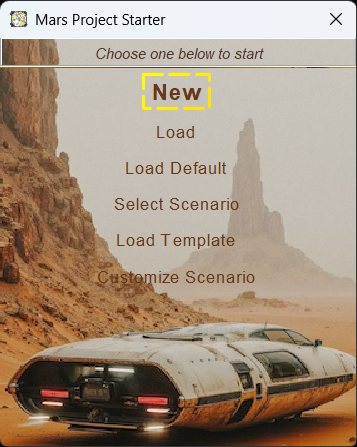
Main Starter
The New option start a new Simulation using the Default Scenario. Whilst the Select Scenario allows the selecting of a different pre-defined Scenario in a new Simulation.
Command Line Starting Sequence
The ZIP distribution supports both Windows and Linux and uses a command line starting sequence.
It also provides 2 variants of the mars-sim application.
- Swing based UI
- Console based engine that is accessed via SSH
Start commands are:
- bin/mars-sim-swing - Linux start script for the Swing variant
- bin/mars-sim-swing.cmd - Window start script for the Swing variant
- bin/mars-sim-console - Linux start script for the Console headless variant
- bin/mars-sim-console.cmd - Window start script for the Console headless variant
Common command line arguments are:
 -baseurl <URL to remote content>    URL to the remote content repository
                                     (defaults to master in GitHub)
 -configdir <directory>              Directory for configurations files
 -datadir <path to data directory>   Path to the data directory for
                                     simulation files (defaults to user.home)
 -diags <<module>,<module>.....>     Enable diagnostics modules
 -help                               Display help options
 -load <path to simulation file>     Load the a previously saved sim.
                                     No argument open file selection dialog.
                                     'default' will use default
 -location <coordinates>             Set the coordinates of the new template Settlement
 -log <logfile [size K|M|G:count]>   Enable logging to a logfile sequence with an optional size per file
 -new                                Enable quick start
 -scenario <scenario name>           New simulation from a scenario

 -sponsor <sponsor>                  Set the sponsor for the settlement template
 -template <template name>           New simulation from a template
 -timeratio <Ratio (power of 2)>     Define the time ratio of the
                                     simulation
Swing variant arguments
 -cleanui                            Disable loading stored UI configurations
 -noaudio                            Disable the audio
 -profile                            Set up the Commander Profile
 -site                               Start the Scenario Editor

Console variant arguments
 -noremote                           Do not start a remote console service
 -remote <port number>               Run the remote console service [default]
 -resetadmin                         Reset the internal admin password